---
title: How to Add Money to your Adesco account
description: Use this method to add funds to your Adesco balance so you can use them later for payments or conversions..
---
[Skip to content](https://www.help.adesco.co.il/how-to-add-money-to-your-adesco-account#main-content)
[](https://www.help.adesco.co.il/?hsLang=en)
Open main navigation
Close main navigation
- [Contact us](https://tgvyy.share.hsforms.com/28NEcofvcQnmjNX3r7APrGQ)
[Contact us](https://tgvyy.share.hsforms.com/28NEcofvcQnmjNX3r7APrGQ)
How can we help you?
- There are no suggestions because the search field is empty.
1. [Help center](https://www.help.adesco.co.il/?hsLang=en)
2. [Add Money to Adesco Account](https://www.help.adesco.co.il/add-money-to-adesco-account?hsLang=en)
# How to Add Money to your Adesco account
## Use this method to add funds to your Adesco balance so you can use them later for payments or conversions.
### **Step 1: Add money**
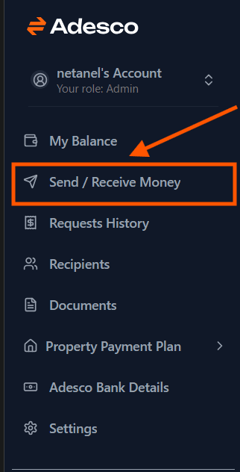
1. From the main menu, click **Send / Receive Money**.
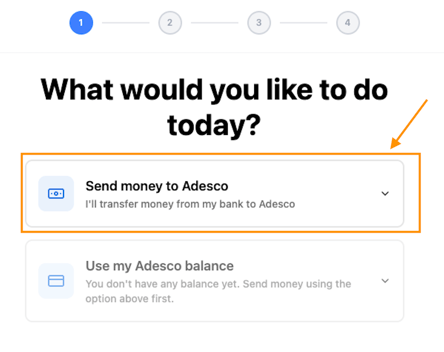
2. Select **send money to Adesco**.
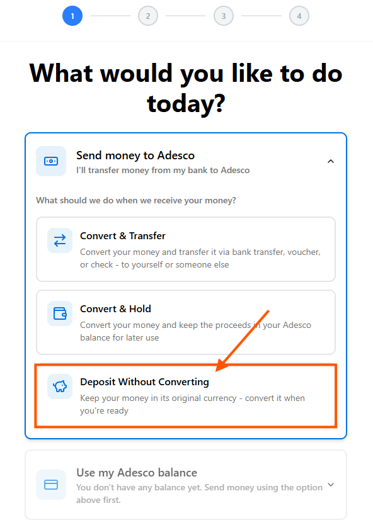
3. Select **Deposit Without Converting**.
### **Step 2: Enter Amount and Currency**
1. Enter the **amount** you want to add.
2. Select the currency from the dropdown list.
.png?width=357&height=247&name=image%20(25).png)
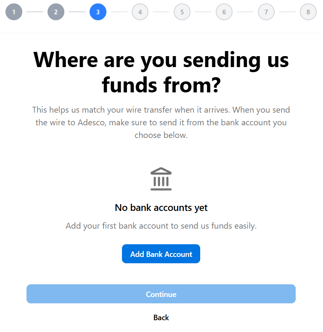
### **Step 3: Choose Bank Account**
1. Select the bank account you want to send the funds from or add a new one.
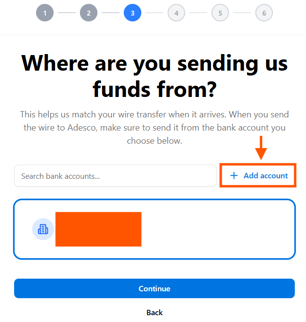
2. If you haven’t added a bank account yet, click **Add New Account** and follow the instructions.
### **Step 4: Send a Wire to Adesco**
1. After confirming your request, you’ll see Adesco’s bank details.
2. Send a wire transfer from your bank to Adesco using the provided details.
- If sending from abroad, make sure it’s an **international wire transfer**.
- Send funds in your original currency for Adesco to convert.
3. Funds will appear in your Adesco balance once they are received.
.png?width=388&height=289&name=image%20(26).png)
### **Step 5: Review and Track Progress**
1. After submitting, you can view the **Add Funds Progress**:
- **Waiting for incoming funds** - Action required: send the wire transfer.
- **Funds Added to Balance** - Your funds have been successfully added.
2. You can also **Edit Amount** or **Cancel Transfer** if needed.
.png?width=369&height=386&name=image%20(27).png)
- [Getting started](https://www.help.adesco.co.il/getting-started?hsLang=en)
- [Conversions and Transfers](https://www.help.adesco.co.il/conversions-and-transfers?hsLang=en)
- [Transferring Money and Making Payments](https://www.help.adesco.co.il/transferring-money-and-making-payments?hsLang=en)
- [Add Money to Adesco Account](https://www.help.adesco.co.il/add-money-to-adesco-account?hsLang=en)
- [Settings](https://www.help.adesco.co.il/settings?hsLang=en)
- [Support](https://www.help.adesco.co.il/support?hsLang=en)
- [Accessibility](https://www.help.adesco.co.il/accessibility?hsLang=en)
- [Articles for Customers](https://www.help.adesco.co.il/articles-for-customers?hsLang=en)
- [Property Payment Plan](https://www.help.adesco.co.il/property-payment-plan?hsLang=en)
[](https://app.adesco.co.il)
[mailto:email@email.com](mailto:email@email.com)
Copyright © 2026,