
Intro
Buying property in Israel involves multiple payments spread over months or years - deposits, installments, tax vouchers, lawyer fees, and more. Keeping track of all of them while managing currency conversions from abroad is one of the most stressful parts of the process.
The Adesco Property Payment Plan Hub solves this. It gives you a single place to plan every payment milestone, track what's been paid and what's coming up, and initiate transfers directly through Adesco - without ever losing track of where you stand.
This guide walks you through how to set it up and use it effectively.
The Short Answer The Property Payment Plan Hub is a built-in tool inside your Adesco account that lets you map out your full Israeli real estate payment schedule - by property, by recipient, by due date, and by payment type (bank transfer, Shovar, tax voucher, and more). You can initiate payments directly from the Hub, mark milestones as complete, sync due dates to your calendar, and export your full payment history. All payment amounts are tracked in ILS (Israeli New Shekel).
What Is the Property Payment Plan Hub?
The Property Payment Plan Hub is a feature inside your Adesco online account (app.adesco.co.il) designed specifically for foreign buyers managing multi-payment Israeli real estate transactions.
Most Israel property purchases - especially new construction - require a series of structured payments tied to construction milestones, legal events, and tax obligations. These often include:
- Shovarim - construction voucher payments due as building reaches specific stages
- Bank transfers to the seller or developer
- Tax vouchers for Mas Rechisha (purchase tax) and Mas Shevach (appreciation tax)
- Lawyer and broker fees
The Hub lets you plan all of these in advance, set due dates, and track their status in real time.
How Do I Add a Property to the Hub?
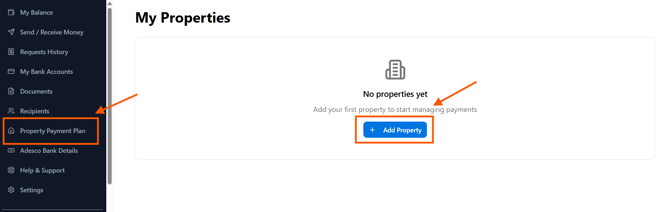
If you're logging in for the first time, your Hub will be empty. Here's how to add your first property:
- Log in to your Adesco account at app.adesco.co.il
- In the left-hand navigation menu, click Property Payment Plan
- Click Add Property in the center of the screen
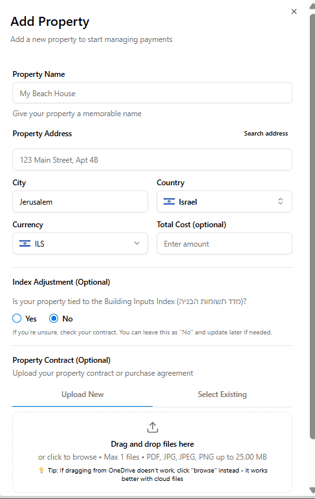
A property details window will open. Fill in the following:
- Name - Give your property a name you'll recognize easily, such as "Tel Aviv Apartment" or "Jerusalem Investment Property"
- Address - Enter the full address, including city and country
- Currency and Total Contract Amount - If you know the full purchase price, enter it here in ILS (or your contract currency). This allows the Hub to show you how much of the total you've paid vs. how much remains
- Index Adjustment - If your payments are linked to the Israeli Building Construction Index (the Madad), select Yes here. The Madad is a government index that adjusts construction payments monthly based on building cost inflation - your contract will specify whether it applies
- Contract Upload - You can upload your purchase contract directly to the property record, so it's always accessible when you need to check a payment term or due date
Click Save when done. Your property will now appear in the Hub.
What Is the Madad and Do I Need to Enable Index Adjustment?
The Madad (Hebrew: מדד תשומות הבניה - the Israeli Building Construction Index) is a monthly government index that tracks the cost of construction inputs. Many new-build developer contracts in Israel link payment amounts to this index, meaning the NIS amount you owe on future installments increases slightly each month as the index rises.
If your contract includes an index linkage clause, you should select Yes for Index Adjustment when setting up your property. If you're unsure whether your contract is Madad-linked, check with your Israeli lawyer or contact the Adesco team directly.
How Do I Plan a Payment Milestone?
Once your property is saved, you can start adding the individual payments that make up your purchase schedule.
- Select your property from the Hub
- Click Plan a Payment
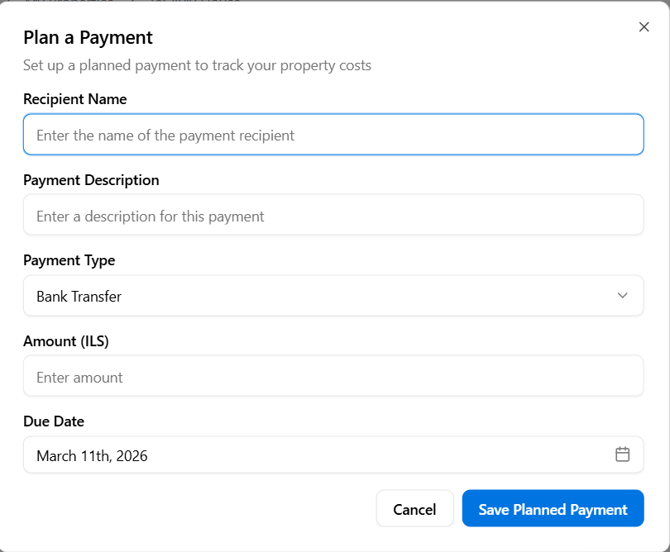
- Fill in the payment details form:
- Recipient Name - Who is this payment going to? (e.g., the developer's name, your lawyer's firm, the tax authority)
- Payment Description - A brief label for this milestone (e.g., "Second Installment," "Mas Rechisha Tax Payment," "Lawyer Fee")
- Payment Type - Select the method from the dropdown:
- Bank Transfer - A standard wire transfer to the recipient's Israeli bank account
- Construction Voucher (Shovar) - A structured payment instrument required by some developers for staged construction payments
- Tax Voucher - Used for government tax payments such as Mas Rechisha or Mas Shevach
- Amount - Enter the amount in ILS. All payments in the Hub are tracked in Israeli Shekels
- Due Date - Set the date by which this payment needs to be completed
Click Save Plan Payment. The milestone will now appear in your property dashboard.
Repeat this for each payment in your schedule. Most buyers add all their planned milestones at the start so they have a complete picture of what's ahead.
How Do I Track and Manage My Payments?
Once your milestones are saved, your property dashboard becomes your command center for the entire transaction.
At the top of the dashboard, you'll see your property details alongside the total contract value.
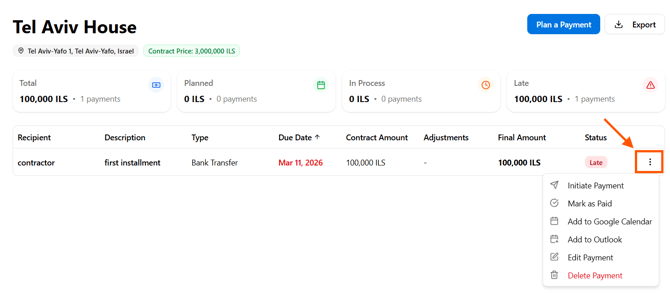
The summary cards break down your payments into four categories:
- Total - The combined value of all payment milestones you've entered
- Planned - Payments scheduled for a future date that haven't been initiated yet
- In Process - Payments that Adesco is currently executing on your behalf
- Late - Payments where the due date has passed without being sent. These are automatically flagged with a red warning icon so nothing slips through
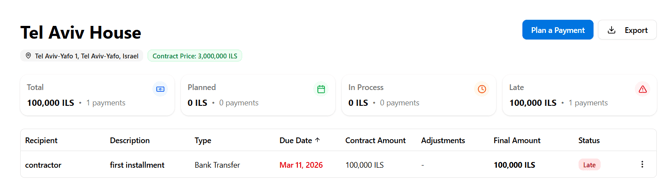
For each individual payment, click the three-dot menu (...) on the right side to access:
- Initiate Payment - Start the actual transfer process with Adesco. This is how you move from "planned" to "in process"
- Mark as Paid - If you made this payment outside the Adesco platform (e.g., directly through your Israeli bank) and want to keep your Hub accurate, use this to manually log it as complete
- Add to Calendar - Sync the due date to your Google Calendar or Outlook so you get a reminder. Note: Adesco will also send you email reminders automatically, so this is optional
- Edit Payment - Update the amount or due date if your contract terms change
- Delete Payment - Remove a milestone if it no longer applies
Can I Manage More Than One Property?
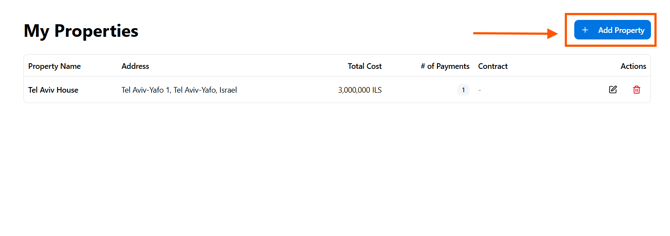
Yes. The Hub is designed to handle multiple properties simultaneously. Click Add Property from the main Property Payment Plan page at any time to set up a second or third property. Each property has its own dashboard, payment schedule, and tracking view.
This is useful for investors managing more than one Israeli real estate transaction, or for buyers who are also tracking an earlier property sale alongside a new purchase.
How Do I Export My Payment Records?
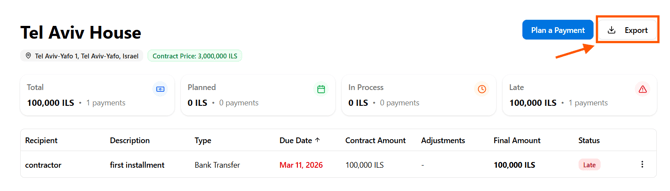
Click the Export button in the top right corner of your property dashboard. You can download your full payment schedule and history as either an Excel file or a PDF - useful for your accountant, your lawyer, or your own records.
Frequently Asked Questions
Q: What currencies does the Property Payment Plan Hub support? A: All payment amounts within the Hub are tracked in ILS (Israeli New Shekel). If you're funding your transfers from USD, GBP, EUR, or another currency, Adesco handles the conversion as part of the transfer process. The Hub shows you the shekel amounts you owe; Adesco handles what it takes to get there.
Q: What is a Shovar (Construction Voucher) and how does Adesco handle it? A: A Shovar (Hebrew: שובר) is a structured payment instrument issued by Israeli property developers for staged construction payments. Rather than a standard bank wire, a Shovar includes specific payment instructions tied to construction milestones. Adesco can execute Shovar payments on your behalf - select "Construction Voucher" as the Payment Type when planning that milestone and the Adesco team will handle the rest.
Q: What happens if a payment goes past its due date? A: The payment will automatically be marked as "Late" in your dashboard and flagged with a red warning icon. Adesco will send you email reminders before due dates, but if a payment does become overdue, contact the Adesco team via WhatsApp (+972-52-220-7326) as soon as possible - especially for property closings where timing is critical.
Q: Can I track payments I made outside of Adesco? A: Yes. Use the "Mark as Paid" option in the three-dot menu for any payment milestone to manually log it as complete. This keeps your Hub accurate even if some payments were made through a different channel.
Q: Is the Adesco platform available 24/7? A: Yes. You can log in, add properties, plan payments, and review your dashboard at any time at app.adesco.co.il. For initiating transfers and payments, the Adesco team is available during business hours and via WhatsApp.
Have questions about a specific payment or your property schedule? WhatsApp the Adesco team directly at +972-52-220-7326 or visit adesco.co.il/contact-us.